

Disclosure: This page contains affiliate links. If you buy through them we may earn a commission, at no extra cost to you. We picked these models from published specifications and owner reviews; we have not lab-tested them.
Quick answer: To set up a walking desk, raise your desk to your elbow height plus the height of your walking pad’s deck, usually 4 to 6.5 extra inches. Put the screen at eye level, plug the pad straight into a wall outlet, and start at 1 to 2 mph. Low decks like the UREVO SpaceWalk E1L (4.2 in) need the least extra height.
A walking desk is a standing desk with a walking pad under it, and the setup is where most people go wrong. The pad lifts you several inches, so a desk that fits you standing can be too low once you walk.
Here’s the setup in the order that matters. The numbers come from the listed specs of the 43 machines in our walking pad comparison table.
The setup in seven steps
- Work out your walking desk height (elbow height plus deck height).
- Choose a pad that suits desk work.
- Clear the space under and behind the desk.
- Sort out the floor.
- Set your screen and keyboard for walking.
- Plan power and cables.
- Start slow and build up.
Step 1: Work out how high your desk needs to go
Your desk surface should sit at about elbow height, forearms level and shoulders relaxed. On a walking pad your elbows are higher by the height of the deck, so: walking desk height = your normal standing desk height + your pad’s deck height.
In our database, flat walking pads list an overall height of about 4.2 to 6.5 inches; a few models with fold-down handrails list about 3.8 inches with the rail down. The belt sits slightly below the listed height, so treat it as the upper end, and add the thickness of any mat.
Best of all, measure: stand on the pad (switched off) in your walking shoes, bend your elbows to 90 degrees and measure from the floor to your forearm. Without the pad, a common rough rule puts standing desk height at about 63% of your height in shoes:
| Your height | Desk height on the floor (approx.) | On a 4.2 in pad | On a 6.5 in pad |
|---|---|---|---|
| 5’4″ | 40.3 in | 44.5 in | 46.8 in |
| 5’8″ | 42.8 in | 47.0 in | 49.3 in |
| 6’0″ | 45.4 in | 49.6 in | 51.9 in |
| 6’4″ | 47.9 in | 52.1 in | 54.4 in |
This step rules desks out. Many electric standing desks top out around 46 to 50 inches, which is too low for many walkers over about 5’10”. If you’re tall, a low pad matters as much as a tall desk. Our guide to the best standing desks for a walking pad compares maximum heights against these numbers.
Step 2: Choose a walking pad that suits desk work
- A low deck. Every inch of deck is an inch your desk has to find. Sort our comparison table by height to find the thinnest.
- A long enough belt. About 35 inches is the floor for slow walking; taller walkers do better with 38 or more. Our walking pad size calculator suggests a belt length, width and weight capacity for your height, weight and pace.
- Capacity with headroom. Aim for a rating at least 50 lb above your weight, or see our walking pads for heavy people.
- No fixed handrail. A fold-down rail is fine; check the under-desk height with it down.
- A remote or app. You can’t see a deck display from the desk, so a remote on the desktop makes speed changes easy.
- Quiet running if you take calls or share walls. See our quietest walking pads.
Four models that tick these boxes are below. For a ranked list, see our best walking pads, or the best walking pads under $200 if budget comes first.
Step 3: Clear the space under and behind the desk
Most walking pads are about 19 to 21 inches wide, so you need a clear gap between the desk legs that’s wider than that, with room for your feet. Watch for low crossbars, keyboard trays and drawer units.
Place the pad so you walk mid-belt with your hands comfortably on the keyboard. Keep the area behind the pad clear (no chair, cables or rug edge) and follow the minimum clearance in your manual. If floor space is tight, our compact walking pads guide lists models that store under a bed or sofa.
Step 4: Sort out the floor
Put the pad on a level, solid surface. On hard floors a rubber equipment mat cuts vibration and noise and stops the pad creeping; on carpet it keeps fibres away from the motor. Add the mat’s thickness to your Step 1 height. If the pad has adjustable feet or a centre support bolt, set it so the deck doesn’t rock, or it will shake your desk too.
Step 5: Set your screen and keyboard for walking
- Monitor at or slightly below eye level, about an arm’s length away. A monitor arm makes this easy.
- Keyboard and mouse near the desk edge, elbows near 90 degrees, wrists straight. If you lean on the desk, it’s too low or you’re too far back on the belt.
- Laptops need a stand and a separate keyboard.
- Stability: lighter single-motor desks can sway at full height. Dual motors, 3-stage legs and crossbars help.
Step 6: Plan power and cables
Walking pads draw a surge of current when they start, and many manuals say to plug them straight into a wall outlet, not an extension cord or power strip. Check yours. Route the cord away from the belt and rollers, and clip desk cables so nothing hangs near your feet. Learn how the safety stop works and keep the remote within reach.
Step 7: Start slow and build up
Many people find 1 to 2 mph comfortable for typing and calls, and 2 to 3 mph better for reading or listening. Start with 20 to 30 minutes once or twice a day and add time as your legs adjust. A plan for the first month helps: our own printable 30-day plan (in the box near the end) includes a desk height worksheet and a speed guide for typing and calls that match Steps 1 and 7. Every few weeks, check the belt is centred and lubricate it as your manual says.
Walking pads that make a desk setup easier
We picked these four from our 43-model database for desk use: low decks, remote or app control and no fixed handrail. All four were in stock on Amazon when we checked in November 2026.
1. Low deck for shorter desks
UREVO SpaceWalk E1L

At 4.2 inches, the SpaceWalk E1L has one of the lowest decks among the flat pads in our database, so it asks the least of your desk: about 47 inches for a 5’8″ walker on the 63% rule. A remote and UREVO’s app let you change speed without looking down. UREVO lists a 1-year warranty.
Watch out for: the 35.4 in belt is short for tall walkers; no incline; 265 lb rating.
Who it’s for: walkers of average height or below, and anyone whose desk only just reaches walking height.
2. Best budget desk pad
Vhorilix XM-A1
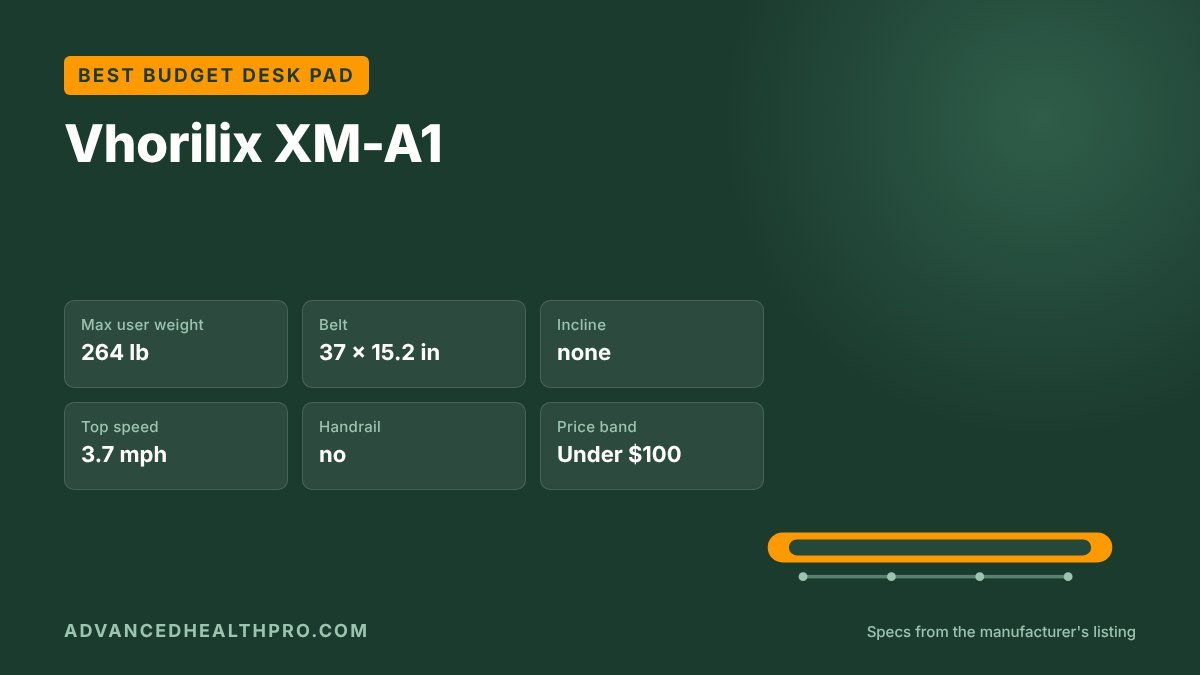
The XM-A1 is the cheapest sensible way to try a walking desk. Its deck is almost as low as the UREVO’s and its 37 inch belt is a little longer, with a large review base for the price band. It’s basic: a remote and LED display, no app, no incline.
Watch out for: remote only; the listing gives both 3.7 and 4 mph as top speed (we use 3.7).
Who it’s for: first-time walkers who want to test the habit before spending more.
3. Best for longer strides
FOUSAE X

The FOUSAE X fits a 40 × 16 inch belt onto a deck under 5 inches tall, a useful mix for taller walkers and anyone who drifts on the belt. It’s rated for 350 lb and reaches 6.2 mph, so it doubles as an after-work jogging pad. Using the manual incline raises the front of the deck, so re-check your desk height on that setting.
Watch out for: 1-year warranty; no app; remote only.
Who it’s for: taller or heavier walkers who want room on the belt without a tall deck.
4. Best fold-away for shared rooms
WalkingPad C2
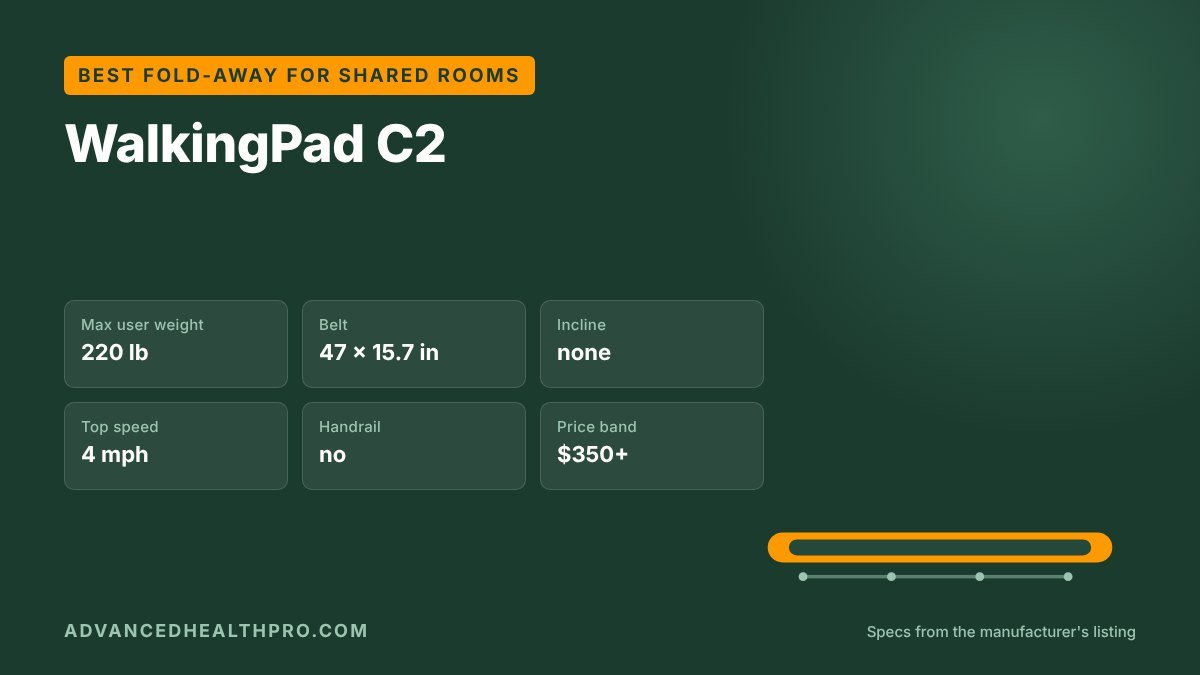
KingSmith’s WalkingPad C2 folds in half to 32.5 inches long, so it disappears under a bed or into a closet after work. Its 47 inch belt is among the longest in our database; only the WalkingPad Z1R (47.6 in) lists a longer one. The limits are real: a 220 lb rating, no incline and the highest price band here. Our WalkingPad review compares it with the P1, Z1R and R2.
Watch out for: 220 lb rating, the lowest of our picks; 1-year warranty.
Who it’s for: walkers up to about 200 lb who need the pad to disappear after work.
How we chose
We don’t lab-test walking pads. We compared the published specs of the 43 models in our comparison table and owner reviews, favouring low decks and controls you can use from the desktop, and confirmed each pick was still listed on Amazon. The desk heights in Step 1 use a rule of thumb; your own measurement beats it.
From our shop
Walking Pad 30-Day Plan & Tracker
Once your walking desk is set up, our printable gives you a simple daily routine to actually use it, plus a desk height worksheet, a speed guide for typing and calls, a 30-day plan in three levels, and daily and 100-mile trackers. US Letter and A4.
We make and sell this planner ourselves.
Frequently asked questions
How high should a walking desk be?
At about your elbow height while standing on the walking pad. For most people that’s their normal standing desk height plus the pad’s deck height, usually 4 to 6.5 inches more.
Can you use a walking pad with a regular desk?
Not comfortably. A fixed desk is built for sitting. You need a height-adjustable desk or converter that goes high enough once you add the pad.
What speed should I walk at while working?
Many people type comfortably at 1 to 2 mph and read or take calls at 2 to 3 mph. Start slower than you think and speed up once walking feels automatic.
How long should I walk at my desk each day?
Start with 20 to 30 minutes once or twice a day and build up; several short sessions are easier to stick with than one long one.
The bottom line
Get the height right first, then pick a low pad with a remote, clear the space and start slow. Of our picks, the UREVO SpaceWalk E1L needs the least extra desk height and the Vhorilix XM-A1 is the cheapest way in. To find a pad that fits your desk, sort all 43 models by height, belt and capacity in our walking pad comparison table.
More walking pad guides
- Best Compact Walking Pads for Small Spaces (2026): 6 Space-Saving Picks
- Best Walking Pads Under $200 (2026): 6 Budget Picks Compared
- Walking Pad vs Treadmill: Which Should You Buy? (2026)
- Best Walking Pad With Handle Bar (2026): 6 Handrail Picks Compared
- Best Walking Pad for Running and Jogging (2026): 6 Picks Compared
- Best Standing Desks for a Walking Pad (2026): 5 Desks Tall Enough to Walk At
- Quietest Walking Pads for Apartments (2026): 6 Low-Noise Picks
- KingSmith WalkingPad Review: P1, C2, Z1R and R2 Compared (2026)
- Walking pad comparison chart: all 43 models
- Walking pad size calculator: belt length and capacity for your height and weight
About AdvancedHealthPro
We compare walking pads and under-desk treadmills by their published specs: weight capacity, belt size, incline, top speed and noise, cross-checked against thousands of owner reviews. We flag listings that contradict their own spec sheets and we say plainly when we have not tested a unit ourselves. How we work · Send a correction