
Disclosure: This page contains affiliate links. If you buy through them we may earn a commission, at no extra cost to you. We picked these models from published specifications and owner reviews; we have not lab-tested them.
Quick answer: Walk at 1 to 2 mph while typing, 2 to 2.5 mph on calls and 3 to 4 mph for a brisk exercise walk. Nearly every walking pad covers that range. The Vhorilix XM-A1 (0.6–3.7 mph) suits desk pace, the TRAILVIBER X01 (4 mph, 41 in belt) suits brisk walks, and the FOUSAE X (6.2 mph) adds light jogging.
The right walking pad speed depends less on the machine than on what your hands and head are doing. A pace that suits email is too slow to count as a workout. This guide gives a starting speed for each task and matches each speed zone to a pad from our comparison of 43 walking pads.
Quick picks by speed zone
- Typing pace (1–2 mph): Vhorilix XM-A1. Slim, low-cost, 0.6–3.7 mph.
- Quiet calls (2–2.5 mph): UREVO CyberPad. Claimed under 35 dB, with auto incline.
- Brisk walking (3–4 mph): TRAILVIBER X01. 41-inch belt, 450 lb rating.
- Power walking and light jogs (4–6 mph): FOUSAE X. A flat pad that reaches 6.2 mph.
- Running speeds (6 mph and up): WELLFIT WFTM037PRO. 7.6 mph with dual handrails.
What speed should you set for each activity?
About 1 to 2 mph for typing, 1.5 to 2.5 mph for calls and 3 to 4 mph for a brisk exercise walk. Use the chart below as a starting point and adjust by a tenth or two.
Use these as starting points, then adjust by a tenth or two. Shorter people usually land at the low end of each range and taller people at the high end.
| What you’re doing | Speed | How it should feel |
|---|---|---|
| Typing and mouse work | 1.0–2.0 mph | No extra typos |
| Video and phone calls | 1.5–2.5 mph | Full sentences, not out of breath |
| Brisk exercise walk | 3.0–4.0 mph | You can talk but not sing |
| Power walk or light jog | 4.0–6.0 mph | Short phrases only |
| Running | 6.0 mph and up | A workout; use a handrail model |
How fast should you walk while working?
Slower than you expect. Most people settle between 1 and 2 mph for typing and near 2 mph for calls. Start at about 1 mph and add 0.1 or 0.2 mph every few minutes. When your typing accuracy drops or your head starts to bob on camera, go back one step. That is your working speed.
Two things make a working speed feel faster than it is. A walking pad lifts you by its deck height, usually 4 to 6.5 inches, so a desk set for standing is now too low; our guide on how to set up a walking desk covers the fix. And a short belt forces a clipped stride that feels rushed even at 2 mph.
How fast should you walk for exercise or weight loss?
For a walk to count as moderate exercise it needs to be brisk. US physical activity guidelines describe brisk walking as 2.5 mph or faster and recommend at least 150 minutes of moderate activity a week. Most adults reach that effort between 3 and 4 mph. The simplest check is the talk test: you can hold a conversation but not sing.
Incline gets you there without more speed, which suits a walking pad because belts are short and most pads stop at 4 mph. Walking at 2.5 to 3 mph on a 5 to 10% incline raises your heart rate while your stride stays short; see our picks for the best walking pad with incline.
For weight loss, choose a speed you can repeat most days and add time before you add speed. If you have a heart, joint or balance condition, ask your doctor what pace is right for you.
What top speed do you need?
Less than the box suggests. Of the 42 models in our table that state a top speed, 25 stop at 4 mph or below, which covers everything from typing to a brisk exercise walk. A 5 to 6.2 mph pad adds power walking and light jogging. For running you need 7.5 mph or more and a handrail; our best walking pad for running guide compares those.
Check how the top speed is reached. The WalkingPad R2 lists 7.5 mph, but our database notes it is limited to 3.7 mph in walking mode with the handrail down.
Belt length should rise with speed, because your stride lengthens as you go faster. About 35 inches works for slow desk walking; above 3 mph, 38 inches or more is noticeably more comfortable. Our walking pad size calculator turns your height and weight into a minimum belt length and weight capacity.
How we chose
We did not test these machines. We compared the published specifications and owner reviews of the 43 models in our walking pad comparison table, matched one model to each speed zone, and confirmed each was still available on Amazon. Superlatives refer to that 43-model table, and noise figures are manufacturer claims. For a wider shortlist, see our best walking pads guide.
The best walking pads for each speed
1. Best for typing pace (1–2 mph)
Vhorilix XM-A1
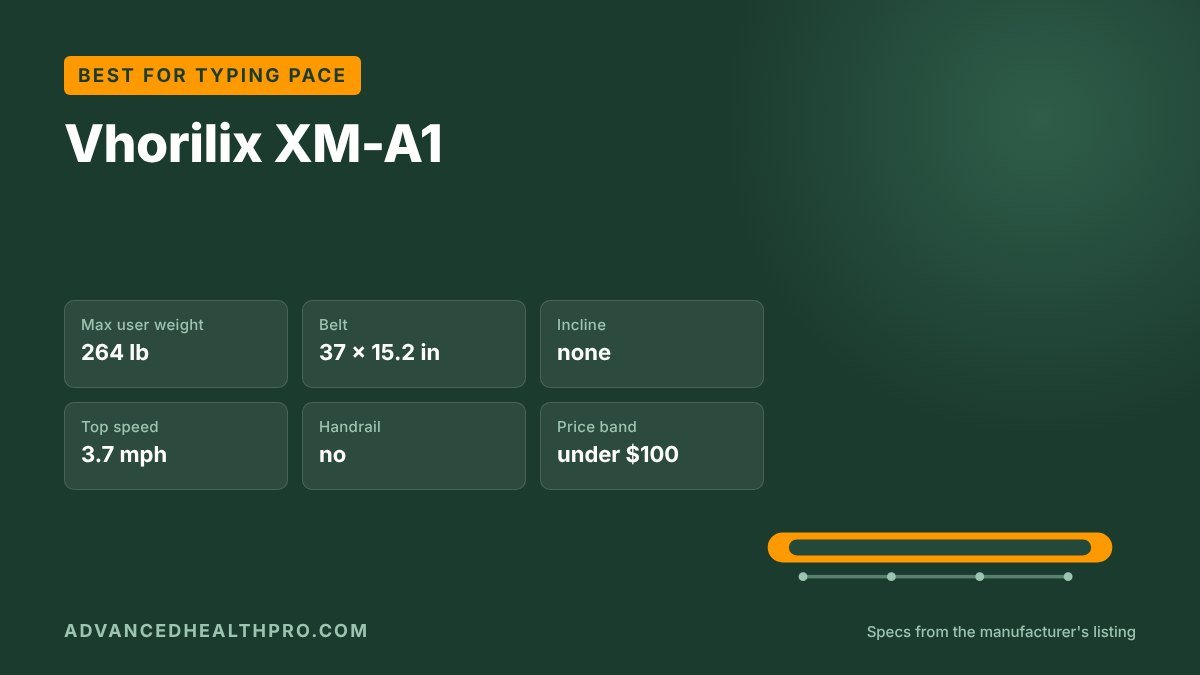
If you only want to keep moving while you type, don’t pay for speed you will never use. The XM-A1 runs from 0.6 to 3.7 mph, tied for the lowest stated top speed in our 43-model table (with the Wilpkracy pad) and still far above any pace you can type at. Its 37-inch belt is long for the lowest price band.
Why it stands out
- 0.6–3.7 mph covers every desk pace
- 37 × 15.2 in belt; about 4.3 in tall and 36.4 lb
Watch out for
- No incline and no handrail
- The listing says 3.7 mph in one place and 4 mph in another; we use the lower figure
Who it’s for: desk walkers who will spend most of their time between 1 and 2.5 mph.
2. Best for quiet calls (2–2.5 mph)
UREVO CyberPad
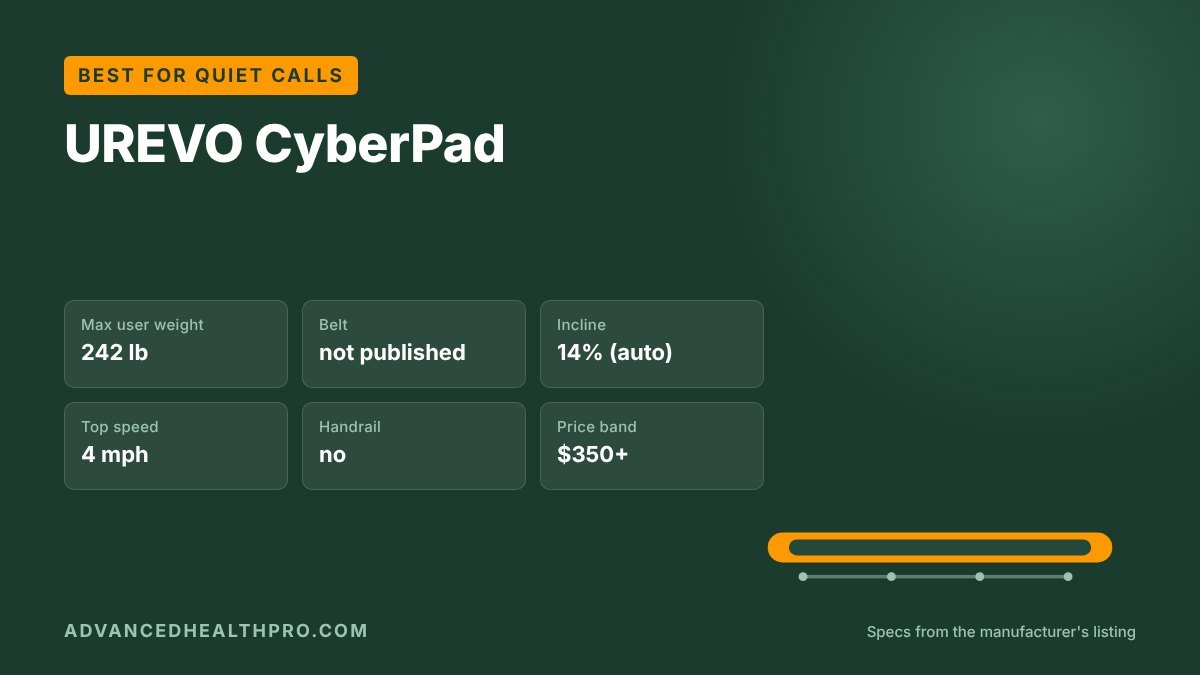
Calls are where a walking pad gets noticed, so noise matters more than speed. UREVO claims under 35 dB for the CyberPad, tied for the quietest figure in our table (with the CHAOKE pad), and it starts at 0.5 mph. When you can’t walk faster because you are talking, its motorized 14% incline adds effort at the same 2 mph.
Why it stands out
- Claimed under 35 dB, tied for the quietest in our table
- Motorized 14% incline adds effort without speed
Watch out for
- Rated for only 242 lb
- 63 lb, and in the highest price band
Who it’s for: people under 242 lb who take a lot of calls and would rather add incline than speed.
3. Best for brisk walking (3–4 mph)
TRAILVIBER X01
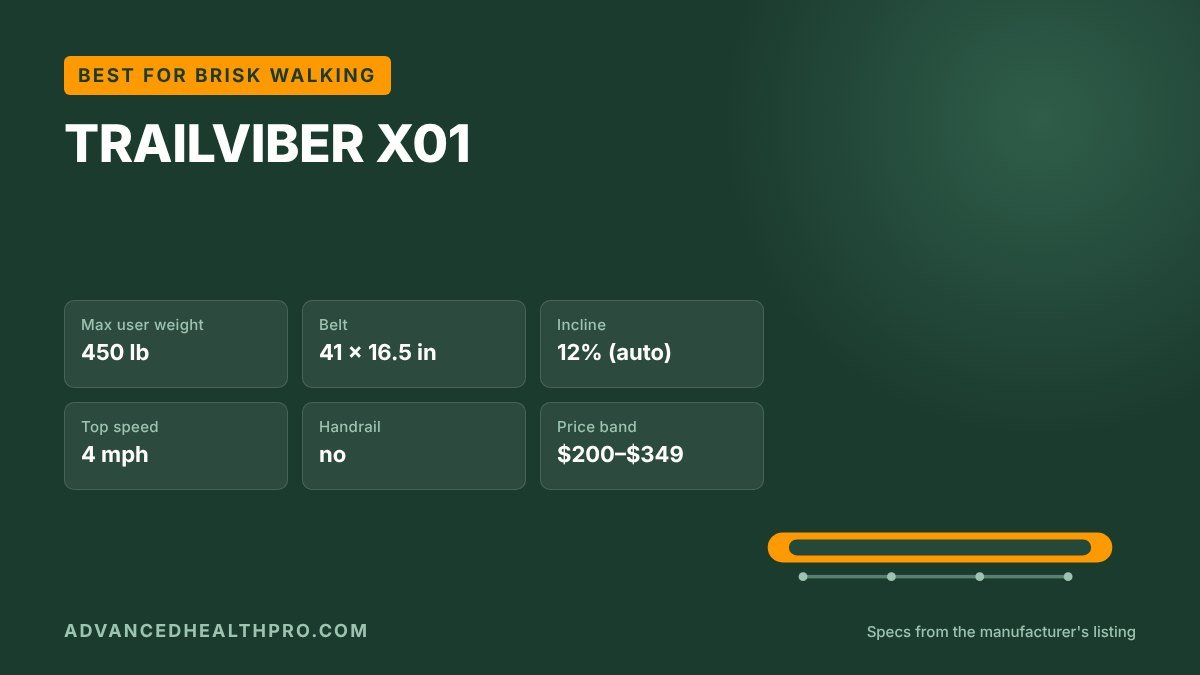
Above 3 mph your stride lengthens and short belts feel cramped. The X01 pairs a 4 mph top speed with a 41 × 16.5 in belt, so a brisk walk has room. It is rated for 450 lb, tied for the highest capacity in our table (with the PACEROCKER ROCKER-S), and its motorized 12% incline changes while you walk.
Why it stands out
- 41 × 16.5 in belt gives a brisk stride room
- 450 lb rating, tied for the highest in our table
Watch out for
- Walking only: it stops at 4 mph
- No handrail and it does not fold
Who it’s for: anyone whose goal is a daily 3 to 4 mph walk, especially taller or heavier users.
4. Best for power walking and light jogs (4–6 mph)
FOUSAE X
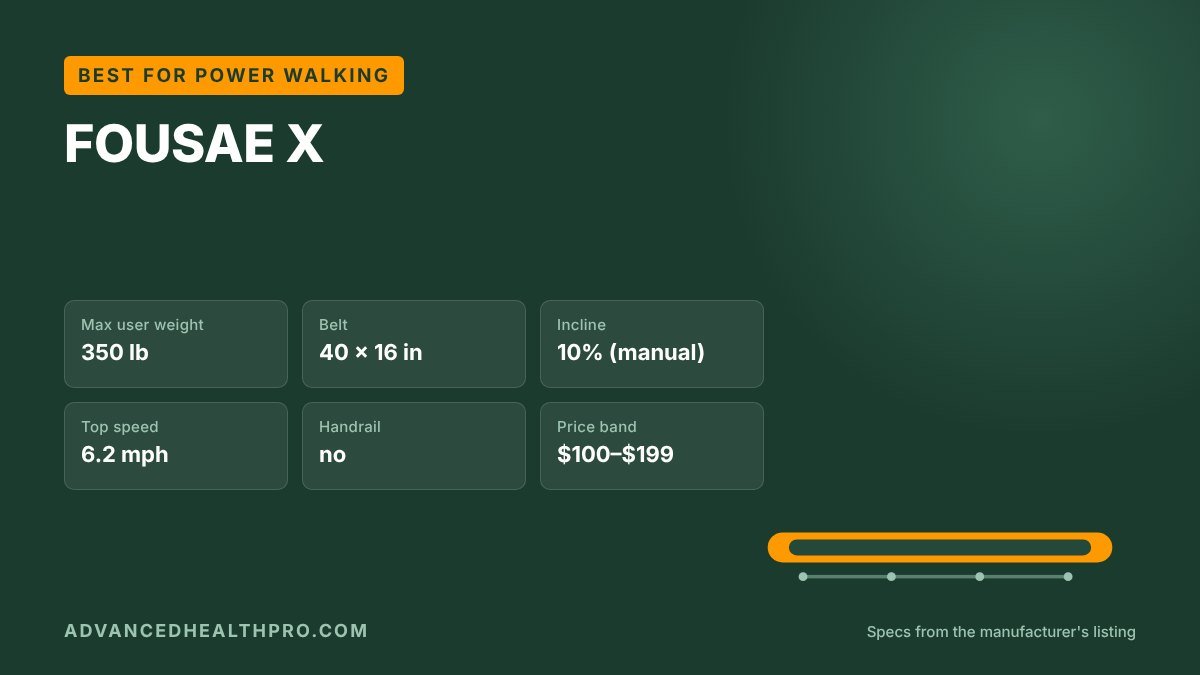
Most walking pads stop at about 4 mph, right where a fast walk becomes a power walk. The FOUSAE X continues to 6.2 mph on a 40 × 16 in belt while staying flat and under 5 inches tall.
Why it stands out
- 0.6–6.2 mph: desk work through a light jog
- 40 × 16 in belt and a 350 lb rating
Watch out for
- No handrail, which matters more above 4 mph
- Manual incline; no app on this version
Who it’s for: people who want one flat pad for slow weekday desk walking and a faster weekend session.
5. Best for running speeds (6 mph and up)
WELLFIT WFTM037PRO
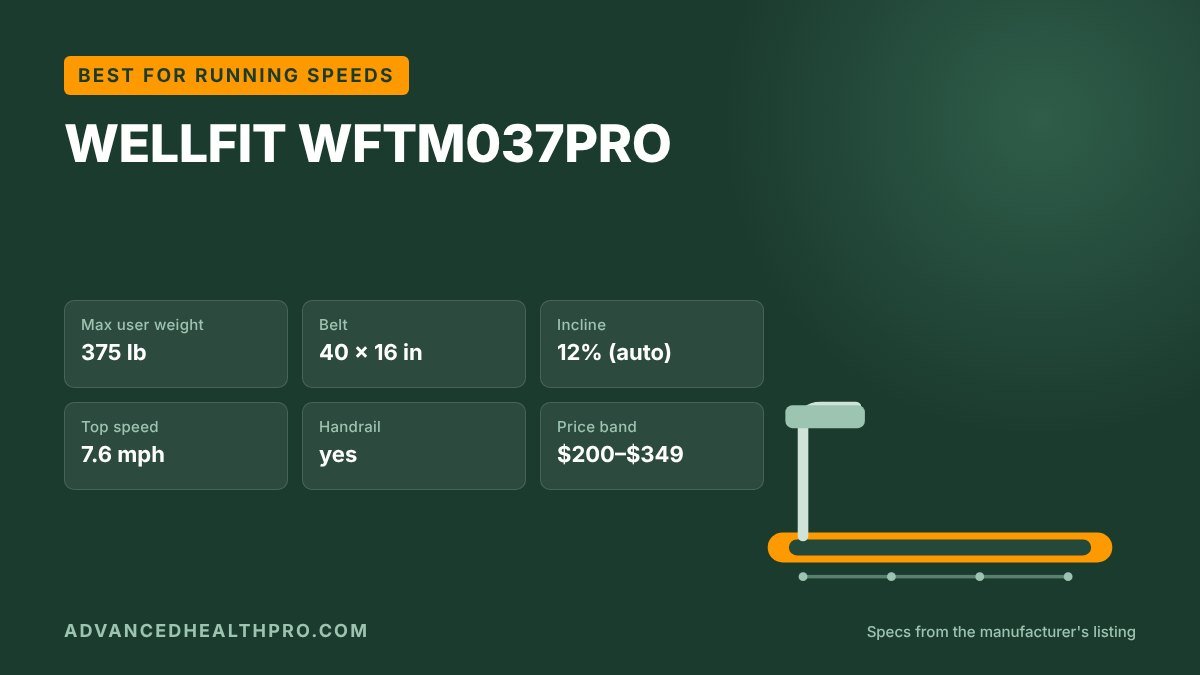
Running needs a handrail, a safety key and a longer belt, not just a bigger number on the display. The WFTM037PRO reaches 7.6 mph, tied for the highest top speed in our table (with the Potupus V300-VF4 and Wildroot Organic V300-8YK), and adds dual handrails and motorized 12% incline. One flag from our database: it is a 2-in-1 folding treadmill with a console that folds to about 6 inches, not a flat pad.
Why it stands out
- 7.6 mph, tied for the fastest in our table
- Dual handrails with speed and incline buttons
Watch out for
- A folding treadmill with a console, not a flat under-desk pad
- 56.4 lb, and 41.7 in tall with the rails up
Who it’s for: runners and joggers who can live with a taller, heavier machine.
From our shop
Walking Pad 30-Day Plan & Tracker
Our printable planner gives you a place to note the pace that works for each task, plus a desk height worksheet, a speed guide for typing and calls, a 30-day plan in three levels, and daily and 100-mile trackers. US Letter and A4.
We make and sell this planner ourselves.
Frequently asked questions
What is a good speed on a walking pad?
A good walking pad speed is 1 to 2 mph for typing, 2 to 2.5 mph for calls and 3 to 4 mph for a brisk exercise walk. The right number is the fastest pace at which your task still feels easy.
How fast can you walk and still type?
Most people type accurately up to about 2 mph, and many prefer 1 to 1.5 mph for detailed work. Raise the speed in 0.1 mph steps until you notice errors, then go back one step.
Is it better to walk faster or use incline?
Both raise the effort. On a walking pad, incline is often more practical because belts are short and most models stop at 4 mph. A 5 to 10% incline at 2.5 to 3 mph feels like a much faster flat walk.
The bottom line
Almost any pad covers the speeds you need, so choose on belt length, weight capacity and noise: the Vhorilix XM-A1 for desk pace on a budget, the TRAILVIBER X01 for brisk walks, and the FOUSAE X if you want room to jog.
To compare speed ranges, belts and capacities for every model, open the walking pad comparison chart.
More walking pad guides
- Walking pad comparison chart: all 43 models
- Walking pad size calculator: belt length and capacity for your height and weight
Buying guides
- Best Small Walking Pads (2026): 6 Compact Picks for Tight Spaces
- Best Standing Desks for a Walking Pad (2026): 5 Desks Tall Enough to Walk At
- Best Walking Pad for Running and Jogging (2026): 6 Picks Compared
- Best Walking Pad With Handle (2026): 6 Handrail Picks Compared
- Best Walking Pad With Incline (2026): 6 Picks Compared
- Best Walking Pads and Under Desk Treadmills (2026): 7 Picks From 43 Models Compared
- Best Walking Pads for Tall People (2026): 6 Long-Belt Picks Compared
- Cheap Walking Pads and Treadmills Under $200 (2026): 6 Budget Picks Compared
- Heavy Duty Walking Pads for Heavy People (2026): 6 Picks Rated 350–450 lb
- Quietest Walking Pads for Apartments (2026): 6 Low-Noise Picks
Brand reviews
- KingSmith WalkingPad Review: P1, C2, Z1R and R2 Compared (2026)
- UREVO Walking Pad Review (2026): All 4 Models Compared, Which to Buy
- WalkingPad vs UREVO: Which Walking Pad Brand Should You Buy? (2026)
Setup, speed and gear
About AdvancedHealthPro
We compare walking pads and under-desk treadmills by their published specs: weight capacity, belt size, incline, top speed and noise, cross-checked against thousands of owner reviews. We flag listings that contradict their own spec sheets and we say plainly when we have not tested a unit ourselves. How we work · Send a correction